

Appearance
Day show with fireworks: BIAS 2026
This page breaks down a daytime show. After reading it you will be able to paint a flag in coloured smoke from one rectangle: load the pad, fire three bands of smoke, and bring the drones home while the picture hangs in the air.
The show file is BIAS 2026 - Romanian Flag - Smoke Show. The bake shown in these docs was computed from that design.
The show at a glance
| Item | Value in the show file |
|---|---|
| Length | 85 s |
| Drones | 150 |
| Launch Pad | 45 m by 30 m, 15 columns by 10 rows, about 3.2 m between neighbours |
| Show height | The Show element is lifted 60 m |
| Environment | Daylight on |
| Picture | One rectangle, 96 m by 68 m, with 150 slots |
| Pyro | Three Ignite clips, blue, yellow and red smoke, starting at 40 s |
Why a day show needs smoke
A drone show at night draws with light on a black sky. In full daylight the sky is bright, so an LED is a small dim point and the eye loses the shape. Smoke works the other way round. It is a large coloured object that reflects daylight, so it stays visible. A daytime picture therefore comes from the smoke, and the drones only carry it to the right place.
Read Daytime shows for what else changes.
The scene tree
text
Launch Pad 1            150 drones, flight plan, pyro loadout
Show                    lifted 60 m, holds the pyro catalog
└─ Romainian Flag       formation group (spelled this way in the file)
   └─ Rectangle 1       150 slots, Pyro and Colors channels
That is the whole show: one group and one shape. All the work is in the slot selections.
One rectangle, three bands
Rectangle 1 has these settings:
| Setting | Value |
|---|---|
| Width (m) | 96 |
| Height (m) | 68 |
| Distribution | Grid |
| Drone count | 150 |
Grid builds 15 columns and 10 rows, about 6.4 m apart across and 6.8 m apart up. The slots are numbered row by row, left to right, starting from the bottom. So each row of 15 holds 5 blue, 5 yellow and 5 red slots, and the bands are upright columns:
| Band | First row | Second row | Slots |
|---|---|---|---|
| Blue (left) | 0 to 4 | 15 to 19 | 50 |
| Yellow (middle) | 5 to 9 | 20 to 24 | 50 |
| Red (right) | 10 to 14 | 25 to 29 | 50 |
To make a band:
- Select Rectangle 1 and press the + in the timeline Channels header. Choose Pyro.
- Right-click the new lane at 40 s and choose Add Ignite.
- In the Properties panel, press Pick slots.
- Hold Shift and drag a box over the left five columns in the viewport.
- Press Done picking.
- Repeat with new Pyro channels for the middle and right columns.
A channel is one row on the timeline. The same three selections are used twice: once on the Pyro channels and once on three Colors channels.
The pad and the loadout
A loadout says which drone carries which product. It lives on the Launch Pad under Pyro loadout:
| Drones | CH 1 |
|---|---|
| 1 to 50 | Airburst Smoke - BLUE |
| 51 to 100 | Airburst Smoke - YELLOW |
| 100 to 150 | Airburst Smoke - RED |
The ranges in the file overlap at drone 100. The first matching row wins, so drone 100 carries yellow, and each colour has exactly 50 drones.
Numbering along is set to Length (columns), so numbers run column by column. Each column has 10 drones, so every colour is a block of five columns, in the same left to right order as the flag. You can place pyro drones anywhere on the grid, because slots that fire a product are assigned drones carrying it. Matching the blocks to the bands is still a good habit: drones have less sideways distance to cover.
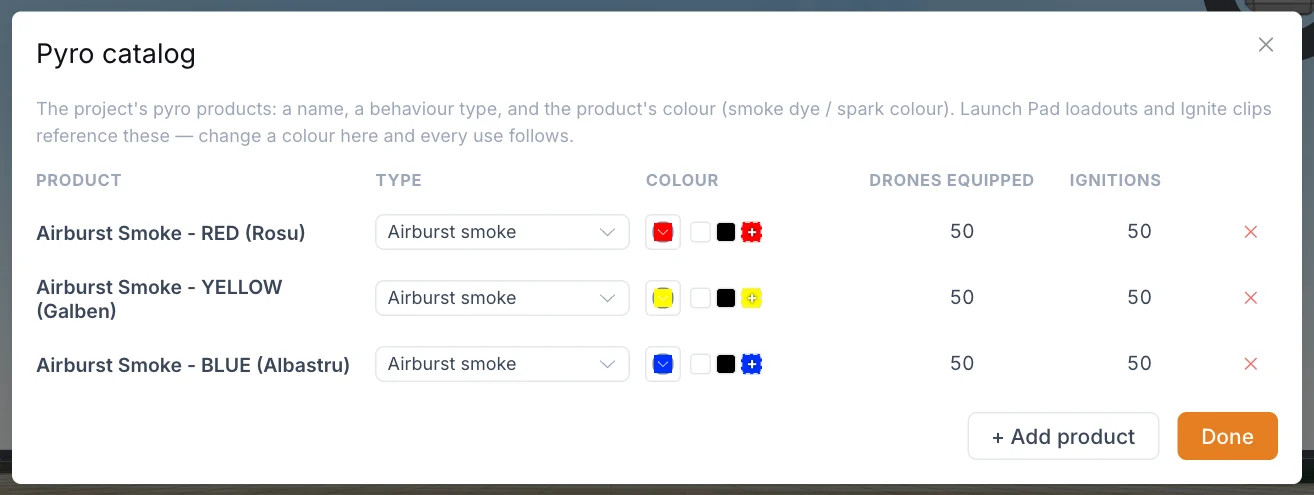
The three products come from the Pyro catalog in the top bar. Each is the Airburst smoke type with a colour. A catalog colour belongs to the product, so an Ignite clip cannot change it.
Takeoff
The Takeoff clip runs from 0 to 50 s and targets Romainian Flag. Its settings:
| Setting | Value | Why it suits this show |
|---|---|---|
| Stagger launch | On | Drones leave in turn, not all at once |
| Mode | Stream | A smooth flow with no pulses |
| Order | Farthest first | Drones with the longest trip leave first, so they arrive at about the same time |
| Vertical climb | Off | The app's advice is to leave it off when drones start already airborne |
The whole group also moves on keyframes, which store a value at a moment in time: from 39.7 to 47 s it slides 20 m along the Y axis, from -40 m to -20 m. The ignitions start during this slide.
Pyro timing
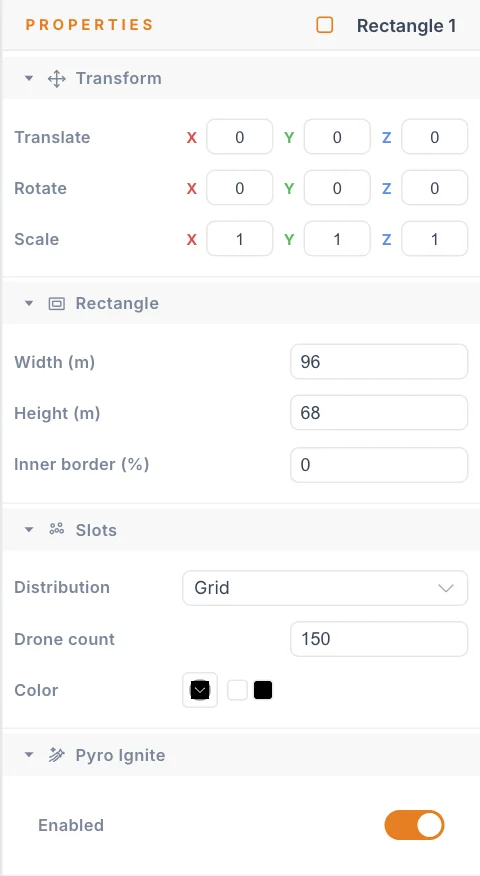
All three Ignite clips share the same timing:
| Setting | Value |
|---|---|
| Clip | 40 to 65.01 s |
| Timing | The radial sweep option |
| Centre | 0, 0, 0, the middle of the rectangle |
| Radius (m) | 80 |
| Sweep time (s) | 1.5 |
A sweep spreads the ignitions over time. Each slot fires after a delay based on its distance from the centre, divided by the radius, then multiplied by the sweep time. The farthest corners are about 54 m from the centre, so they fire about 1 s after the middle. The flag opens from its centre outward, across all three bands at once.
The clip is about 25 s long, which matches the 25 s life of the smoke product. With a Sweep time set, that length does not change when anything fires. It only shows on the timeline how long the smoke stays in the air.
Smoke leaves the drone at ignition and stays where it was fired. That is the main idea of this show. The Return clip starts at 50 s, 10 s after the first ignition, and the fleet flies home while the flag stays in the sky.
The LEDs still run. Three Solid clips cover the same slots from 40 to 85 s, each with a 1 s fade in. Blue is at full opacity. Yellow and red are at 20%.
Timeline summary
| Time (s) | What happens |
|---|---|
| 0 | Takeoff starts, stream, farthest first |
| 39.7 to 47 | The group slides 20 m |
| 40 | First ignitions at the centre, LED colours start fading in |
| About 41 | The last ignitions at the corners |
| 50 | Takeoff ends, Return starts |
| About 65 | The Ignite clips end, the smoke has reached the end of its life |
| 85 | Return ends, the LED clips end, the show is over |
Flight limits used
| Setting on the Launch Pad | Value |
|---|---|
| Horizontal speed (m/s) | 4.5 |
| Up speed (m/s) | 3.5 |
| Down speed (m/s) | 3 |
| Max 3D speed (m/s) | 5 |
| Acceleration (m/s²) | 2 |
| Min separation (m) | 2 |
These values are from this show, not a recommendation for your fleet.
What to copy
- Build one simple shape. A plain grid gives every band straight edges.
- Plan the bands on paper first. Rows of 15 make the slot numbers easy to check.
- Match the loadout blocks to the bands, with Numbering along set to Length (columns).
- Use a short sweep. About 1 s from centre to corner opens the picture without tearing it.
- Leave while the smoke hangs. Start Return soon after ignition.
- Check the numbers. 150 slots firing needs 150 charges. See the Pyro report.
Real pyrotechnics
The app prepares data. Loading, arming and firing pyro on drones is work for a licensed pyro operator. Always follow your local regulations.
Next
Read Daytime shows, or go through the Pyro and fireworks page before you build your own.