

Appearance
Shapes
On this page you will add the five ready-made shapes and set their size, their drone count and how drones spread over them.
Add a shape from the Add menu. A shape only gets flown once it is inside a Formation group.
What all shapes share
A slot is one point of a shape that a drone will fly to.
- Position. A new shape is centred on the show origin, so half of it sits below origin level until you raise it. Increase Translate Z, or drag it with the move tool.
- Facing. Circle, Fill circle, Rectangle and Ellipse stand upright, facing the audience. The Helix rises from its base.
- Drone count. Starts at your fleet size, or 50 if the show has no Launch Pad.
- Colour. The Color field starts black, which means the LED is off. Drones only light up from colour clips. See Colours.
Distribution
Distribution is how slots spread over the shape. Not every shape offers every method.
| Distribution | Layout | Available on |
|---|---|---|
| Edges | Along the outline, or along several nested outlines. | Circle, Rectangle, Ellipse |
| Staggered | Fills the area in a honeycomb pattern. | Fill circle, Rectangle, Ellipse |
| Sunflower | Fills the area in a spiral pattern. | Fill circle, Ellipse |
| Grid | Fills the area in straight rows and columns. | Rectangle |
The fill methods aim for your exact drone count, but the real number can come out slightly lower. Check slots total on the Formation group.
Slot mode
On a Rectangle or Ellipse set to Edges, Slot mode decides how the number of slots is chosen.
| Slot mode | You set | Result |
|---|---|---|
| By count | Drone count | Exactly that many slots. |
| By density (pts/m) | Density (pts/m), default 1, minimum 0.01 | Outline length × density. |
| By spacing (m) | Spacing (m), default 2, minimum 0.05 | Outline length ÷ spacing. |
With By density (pts/m) or By spacing (m), the Drone count field disappears, because the shape works out its own count. This makes By spacing (m) useful when you want drones a known distance apart. Its default of 2 m matches the default Min separation (m) on a Launch Pad.
Check the spacing
Size and count together decide how close drones are. A radius 10 Circle has an outline of about 63 m, so 50 drones sit about 1.26 m apart, which is under the default 2 m separation. Make the shape bigger or use fewer drones. The Min slot distance on the Formation group shows the real figure.
Circle
One or more rings of drones along an outline. Bigger rings get proportionally more drones.
| Setting | What it does | Default |
|---|---|---|
| Radius (m) | Size of the outer ring. Minimum 0.1. | 10 |
| Circle count | Number of rings, from 1 to 24. | 1 |
| Inner radius (m) | Size of the innermost ring. Shown only when Circle count is above 1. The other rings space out evenly between the two. | 3 |
| Distribution | Edges is the only method. | Edges |
| Drone count | Number of slots. Minimum 1. | Fleet size |
| Color | Base colour. | Black |
Fill circle
A solid disc, or a ring-shaped disc if you add a hole.
| Setting | What it does | Default |
|---|---|---|
| Radius (m) | Size of the disc. Minimum 0.1. | 10 |
| Inner hole (%) | Size of a centre hole, as a percentage of the radius, from 0 to 95. | 0 |
| Distribution | Staggered or Sunflower. | Staggered |
| Drone count | Number of slots. Minimum 1. | Fleet size |
| Color | Base colour. | Black |
Rectangle
A filled rectangle, a frame, or a set of nested outlines.
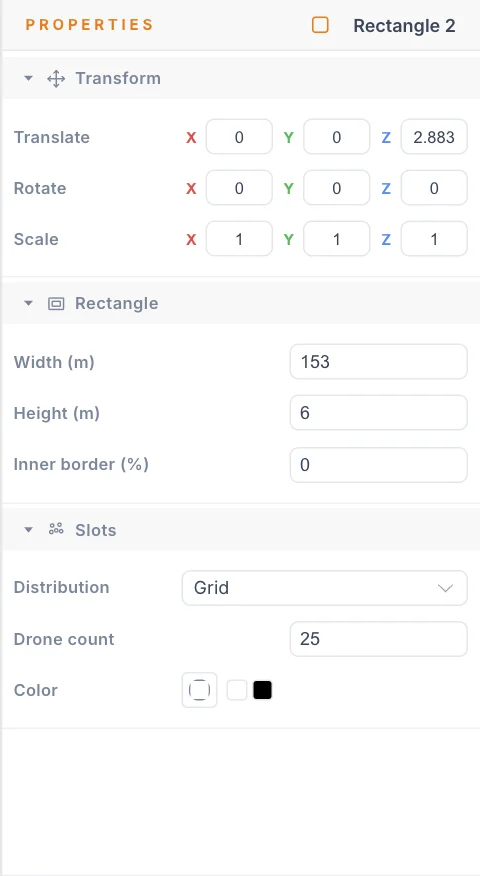
| Setting | What it does | Default |
|---|---|---|
| Width (m) | Horizontal size. Minimum 0.1. | 16 |
| Height (m) | Vertical size. Minimum 0.1. | 10 |
| Inner border (%) | Cuts a hollow centre to make a frame, from 0 to 95. | 0 |
| Distribution | Staggered, Grid or Edges. | Staggered |
| Divisions | Number of nested outlines, from 1 to 24. Shown only for Edges. | 4 |
| Slot mode | See Slot mode. Shown only for Edges. | By count |
| Drone count | Number of slots. Minimum 1. Hidden for By density (pts/m) and By spacing (m). | Fleet size |
| Density (pts/m) | Shown only for By density (pts/m). | 1 |
| Spacing (m) | Shown only for By spacing (m). | 2 |
| Color | Base colour. | Black |
With Edges, the corners of a Rectangle always keep a drone, so it reads sharply.
Ellipse
An oval, filled or as rings.
| Setting | What it does | Default |
|---|---|---|
| Radius X (m) | Half the width. Minimum 0.1. | 12 |
| Radius Y (m) | Half the height. Minimum 0.1. | 7 |
| Inner hole (%) | Size of a centre hole, as a percentage of the radii, from 0 to 95. | 0 |
| Distribution | Staggered, Sunflower or Edges. | Staggered |
| Rings | Number of concentric rings, from 1 to 24. Shown only for Edges. | 4 |
| Slot mode | See Slot mode. Shown only for Edges. | By count |
| Drone count | Number of slots. Minimum 1. Hidden for By density (pts/m) and By spacing (m). | Fleet size |
| Density (pts/m) | Shown only for By density (pts/m). | 1 |
| Spacing (m) | Shown only for By spacing (m). | 2 |
| Color | Base colour. | Black |
Helix
A 3D coil that rises from its base, like a spring standing on the ground. Slots spread evenly along the curve, so there is no Distribution setting.
| Setting | What it does | Default |
|---|---|---|
| Radius (m) | Width of the coil. Minimum 0.1. | 6 |
| Height (m) | How tall the coil is. Minimum 0.1. | 12 |
| Turns | Number of full turns. Minimum 0.1. | 3 |
| Segments / turn | How smooth the curve is, from 3 to 64 points per turn. | 24 |
| Start angle (°) | Where the coil starts around its circle. | 0 |
| Circularity | 1 is a round coil. Lower or higher values squash or stretch one side, from 0.1 to 2. | 1 |
| Drone count | Number of slots. Minimum 1. | Fleet size |
| Color | Base colour. | Black |
Tips
- Staggered gives the most even coverage of an area. Grid reads better on a screen-like rectangle.
- To change a shape beyond these settings, turn it into a point cloud and move drones by hand.
- To make a shape move or pulse, use Motion effects rather than several copies.
Next
Write words in the sky with Text and fonts.